Prompt Engineering is the art of crafting precise, clear, and specific instructions for AI tools. It sounds like a very specific domain that requires a lot of specialized knowledge, but it’s actually a general term for writing detailed instructions to guide AI to produce more accurate and useful responses.
🎯 Learning Goals
Explain the purpose of prompt engineering and its use cases
Describe the limitations of large language models like ChatGPT
Design prompts with specificity and technical language to improve AI responses
📗 Technical Vocabulary
Prompt Engineering
Artificial Intelligence
Large Language Models
Tokenization
Hallucinations
Introduction
The world of web development is changing fast—it’s no longer just about writing code. Now, you’ve got tools like artificial intelligence (AI) to help you level up your skills and build apps smarter and faster than ever. How cool is that?
📗
Technical Vocabulary
Artificial Intelligence (AI) — AI is making computers perform tasks that usually require human intelligence. This includes things like recognizing pictures, answering questions, or even having conversations.
Large Language Models (LLMs) — LLMs are a type of AI that can understand and generate text based on the words and phrases you give them. They’ve been trained on huge amounts of information and they are shockingly good at lots of language-based tasks.
By now, you’re probably familiar with Large Language Models like ChatGPT or Google Gemini! These LLMs are like your super-smart coding sidekicks. They can help with just about anything involving words—from crafting the perfect tagline for your project to brainstorming app ideas or even explaining tricky coding concepts.
In this lesson, we’re diving into the art of writing awesome prompts for LLMs. Why? Because the way you talk to these tools makes all the difference in how useful they are. We’ll share tips and tricks to make sure your AI game is on point.
💭
Think About It (Think-Pair-Share) How have you used LLMs in the past? What are the benefits and limitations?
This is a good opportunity to mention that there are other LLMs outside of ChatGPT. Other popular options include:
Gemini — Google
Llama — Meta
Claude — Anthropic
Demystifying LLMs
LLMs are essentially very fancy autocomplete systems. They rely on patterns, the context you provide, and huge amounts of training data to predict the next word in a sentence.
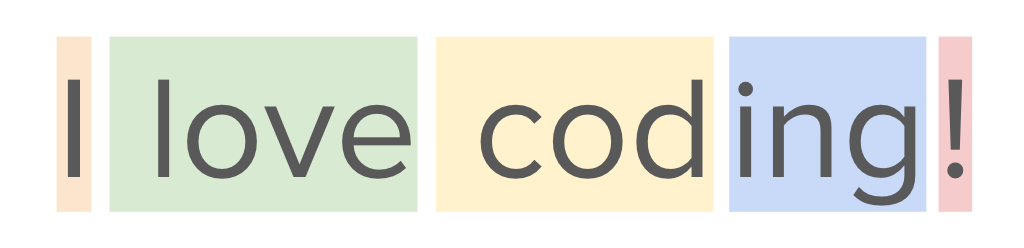
LLMs break down text into smaller pieces called tokens, which the model uses to understand and generate language. Tokens can be as small as individual characters, but are sometimes whole words! For example, the sentence “I love coding!” might be tokenized like this:
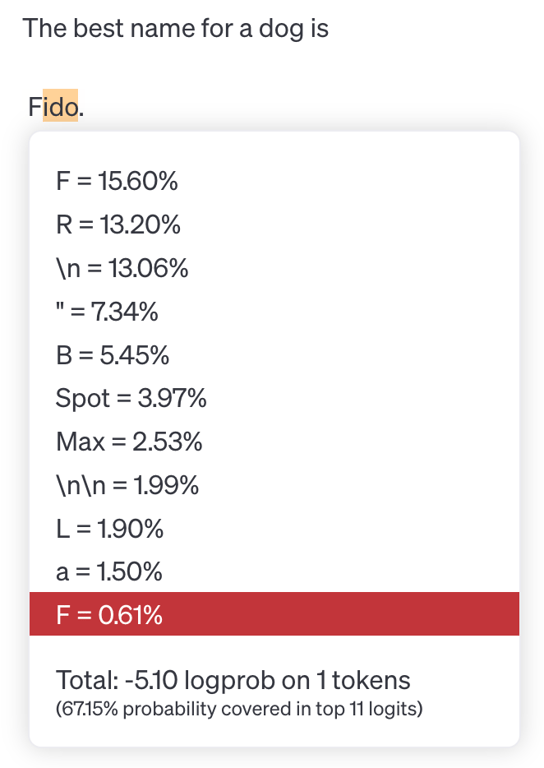
LLMs like ChatGPT process and analyze text at the token level, using patterns in these tokens to predict the next value in a sequence. For example, if you write “The best name for a dog is“ the LLM predicts the most likely tokens to come next, based on its model of human language. In the image below, you can see that while the model selected “Fido” to complete the sentence, there were other likely tokens that could come next such as “R”, “B”, “Spot”, or “Max.” It’s important to note that LLMs are generally set to include some randomness, so it doesn’t always select the most likely token! This is why when you ask an LLM the same question twice, you will likely get slightly different responses.
Once the LLM selects the next token, it doesn’t stop there! Now, it uses the entire original sentence plus the new token to predict the next token after that and so on. This leads to a butterfly effect where small differences in the starting state of a system lead to vastly different outcomes. In the example below you can see that since the sentence was completed with “Fido,” the remaining tokens follow that idea.
However, if the model had completed the sentence with “Spot” instead, the rest of the response would have been different as well.
These examples begin to illuminate some of the limitations of AI tools like Large Language Models. The AI is simply guessing the next word based on statistical patterns in its training data, but it can’t really “think” like humans do.
💭
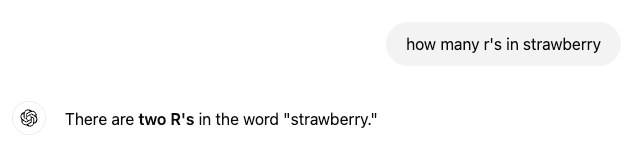
Think About It Now that you know about how LLMs work, why do you think ChatGPT generated this incorrect response?
From the AI's perspective, "strawberry" is not a sequence of individual letters, but a sequence of token IDs.
Miscounting the 'R's in "strawberry" shows how humans and AI see text differently. We read text naturally, letter by letter, but AI tools, like ChatGPT, chunk text into tokens that combine multiple letters or even entire word parts.
Knowing this helps you use AI better! It’s a reminder that while these models are super smart, they don’t "think" like we do. That’s why they sometimes mess up even on easy stuff.
Other limitations of AI:
Beware of biases! These models are trained on large datasets that reflect societal biases.
Watch out for hallucinations. LLMs sometimes make stuff up! Because of the tokenization process, LLMs sometimes generate text that seems realistic, but is actually inaccurate or misleading.
Think of it like a friend who’s super confident about random facts but sometimes just makes stuff up when they don’t know the answer. For example, if you asked, "Who invented pizza?" and the AI said, "Pizza was invented by aliens in 1850"—that’s a hallucination. It’s not lying on purpose; it just doesn’t know the answer and guesses based on patterns in its training data.
These hallucinations happen because AI doesn’t "know" things the way humans do. It doesn’t have facts stored like a library—it predicts what sounds right based on the data it’s been trained on. Sometimes those predictions are spot on, but other times... not so much!
Limited knowledge. LLMs are essentially a snapshot of the world’s knowledge at the moment of their training. For GPT-4 Turbo, the training data cut-off was December 2023. This means the model typically does not have knowledge of recent events unless specifically enabled with a "browse the internet" feature.
AI tools are fantastic at generating ideas and speeding up workflows, but they’re not magic. They’re super advanced word machines that still rely on your input. That’s why learning to craft effective prompts is such a big deal—it helps you get the most accurate and useful results from AI.
Privacy Considerations
While the model itself doesn’t “remember” things from your conversation, the platform through which you access that model might! For example, ChatGPT is a platform through which you access and interact with various large language models developed by OpenAI, like GPT-4o. As part of this platform (ChatGPT), OpenAI does implement some memory systems to store previous messages and conversations. As with any modern web application, they do collect user data, including the messages you send and any data you share with the application. This means OpenAI could store this data and use it in the training of future models!
For this reason, it’s important to be mindful of the information you share on platforms like ChatGPT. Never share personal or sensitive information, such as passwords or financial details, in a chat with an LLM. Because chatbots can feel personable, it's easy to make this mistake—but it's important to avoid sharing personal details like names, addresses, or other sensitive information.
💡
Did You Know?
You can easily exclude your data from future training by changing the settings in ChatGPT. Click your user icon in the top right corner and select Settings. From there, select Data Controls and then turn Off the option to Improve the model for everyone.
During this course, we’ll use ChatGPT as a helpful coding buddy. Ready to unlock the power of AI for web development? Let’s get started! 💻
Writing Effective Prompts
Follow along with me in ChatGPT! Remember, Large Language Models are trained to have some randomness. This means you might get a different response than the one I get! You’ll probably get similar responses, but not exactly the same.
Don’t think I want to include this based on time! But this section provides guidance on Google vs. AI.
Different From Google
Don’t use ChatGPT or other LLMs like you use Google. These are different tools and we should treat them that way!
Search engines like Google match keywords or phrases to existing information on the internet and rank those web pages according to relevance, quality, and other factors. Yes, Google generally includes an AI-generated summary at the top of your search requests now, but the results from that search request are
Use a search engine when you need to find a wide range of information on a specific topic by keyword matching.
Use AI when you need a more nuanced understanding of a topic, want to generate creative content, or require answers to complex, open-ended questions that may require context analysis and interpretation beyond simple keyword matches.
Essentially, use a search engine for basic fact-finding and AI for deeper insights and creative applications.
Game: Google or ChatGPT?
What does CSS stand for?
What is the meaning of CSS and what role does it play in web development?
General Techniques
Be Specific
Use Technical Language
Include Context
The Basics: Be Specific, Use Technical Language, and Include Context
Let’s start by looking at an example prompt and the results. Imagine you are creating a site and you want to center an element in the middle of the window. Let’s start by entering this prompt in ChatGPT.
❌
How do I center something?
Ok we got some answers and one of them might be helpful for our purposes, but we also got a lot of information that’s completely unrelated to our specific use case.
✅
What’s the best way to center an HTML div element horizontally and vertically using CSS?
These results are much more specific and applicable to our site. Why? Our prompt was better! We listed the specific technologies we want to use, which gave the LLM the context it needed to output a more specialized response. Additionally, we specified that we wanted to center the element both horizontally and vertically, which led to an accurate and complete response.
✏️
Try-It Compare and contrast the results from each the prompts below. Why does the second prompt lead to more accurate results?
❌
How do I change the style of a link?
✅
How do I change the default style of an anchor tag using CSS? Write any CSS declarations in a separate styles.css file.
Beyond the Basics
When it comes to prompt engineering for web development, specificity, technical language and providing context will take you a long way! But there are also other strategies for refining the response. Next up, let’s look at how to control the response length and format.
❌
How do I style a button?
⚠️
What’s the best way to style a button using CSS?
✅
What’s the best way to style a button using CSS? Provide an example code snippet with a comment next to each line of CSS.
In this example, I added specificity, technical language, and context, but I also asked the LLM to provide a code snippet with comments. By specifying the kind of output I expect, I can tailor the response to exactly what I need!
You can apply these strategies to any content! This afternoon we’ll dive into learning about JavaScript. Let’s use ChatGPT as an exploration tool to learn the basics of JavaScript before we get started.
✏️
Try-It | Specific Prompts Enter this prompt in ChatGPT: “What is the role of JavaScript in building a web application? Explain it to me like I’m 10 in a single paragraph.”🤖 AI Connection
Consider comparing responses from two different LLMs. How are they different? In addition to using ChatGPT you might explore Gemini, Llama, or Claude.
Control Response Length and Format
Summarize in 3 bullet points the most important elements of JavaScript syntax.
List the steps to incorporate JavaScript into a web application.
Describe hallucinations in the context of large language models in 30 words or less.
Explain how to round the corners of an HTML div element using a CSS code example.
Compare HTML, CSS, and JavaScript in a tabular format.
Write 3 analogies to explain the relationship between HTML and CSS in web development.
Create a flowchart that shows the steps for changing a tire.
Give me an acronym to help me remember the steps for using Flexbox in my web designs.
✏️
Try-It Think of a topic you’re unfamiliar with. Ask ChatGPT to explain it to you in whichever format you think would be helpful!
Iterative Prompting
So what if you craft or engineer your prompt, but it still doesn’t produce exactly what you were looking for? You can always try again! Generative AI like ChatGPT is like having an infinitely patient friend. You can follow-up and ask it to revise the results 10 times and it will never get annoyed with you.
Iterative prompting is the process of prompting, evaluating the response, and then revising to clarify what you want and prompting again.
Prompt
Evaluate
Revise/Follow-Up
You can revise your original prompt if the results aren’t close to what you wanted. From there, you can use the arrows to switch between prompts with their corresponding responses.
Alternatively, you can continue the conversation. Instead of revising the original prompt, add a follow-up prompt that breaks down the changes you would like to see.
Let’s try this out and see what it looks like!
❌
Build an online store webpage based on this HTML table with product inventory for a bookstore called Plot & Prose.
Ok so this works, but it gave me all of the HTML and CSS in one HTML file. I didn’t specify that I wanted a separate CSS file! Let’s edit the original prompt.
⚠️
Build an online store webpage based on this HTML table with product inventory for a bookstore called Plot & Prose. Put all CSS in a styles.css file and link to that file from the HTML.
Better! By modifying the original prompt, we can see the difference between the first and second responses by using the arrows to toggle between our prompts and the corresponding responses.
But I was imagining a card for each book instead of a table format. This time, instead of modifying the original prompt, I’ll follow up with an additional request.
✅
Great! Now, please change the format so that each book or row of the table is a single card in a collection of cards. Each card should display all of the book information.
Rather than adjusting my original prompt, I followed up with additional information to get the end result I wanted!
💡
Did You Know? LLMs like ChatGPT actually do respond better to kindness. “Using polite prompts can produce higher-quality responses,” according to a study by a team at Waseda University and the RIKEN Center for Advanced Intelligence Project. But don’t overdo it! Excessive flattery can result in poorer performance.
Practice
📝
Practice 1
❌
How do I build a recipe webpage?
Given the starting prompt above, re-engineer it to address all three of these assumptions:
You want to use only HTML and CSS
You want the design to be responsive on different device sizes
You want to include an image, the ingredients, and the steps for a specific recipe you provide
📝
Practice 2
❌
I want my navigation bar to look good on any device.
Given the starting prompt above, re-engineer it to address all three of these assumptions:
You want your navigation bar to include three links: Home, About Me, and Portfolio
You want to use Flexbox to achieve the responsive design
You’re new to web development
Other Tips
Don’t overthink it! Just get started. You can always redirect the AI after getting an initial response. That’s the great thing about using a language model compared to other tools. It’s a conversation!
If your question is complex, break it into smaller steps! The AI will be more accurate if you break up complex tasks into more manageable steps.
Now, you might be wondering: will AI take over developers’ jobs? 🤔 Honestly, we can’t predict the future (if we could, we’d totally share those lottery numbers with you). But here’s the deal: being a great developer is so much more than just writing code. It’s about thinking critically, solving problems, and creating things with empathy—skills that AI doesn’t quite have.
💼
Takeaways
Prompt engineering is the art of crafting precise, clear, and specific instructions for AI tools
LLMs use tokenization for processing text and predicting the next word in the sequence